On-board log management
Your logs, on board.
Searchable with no uplink.
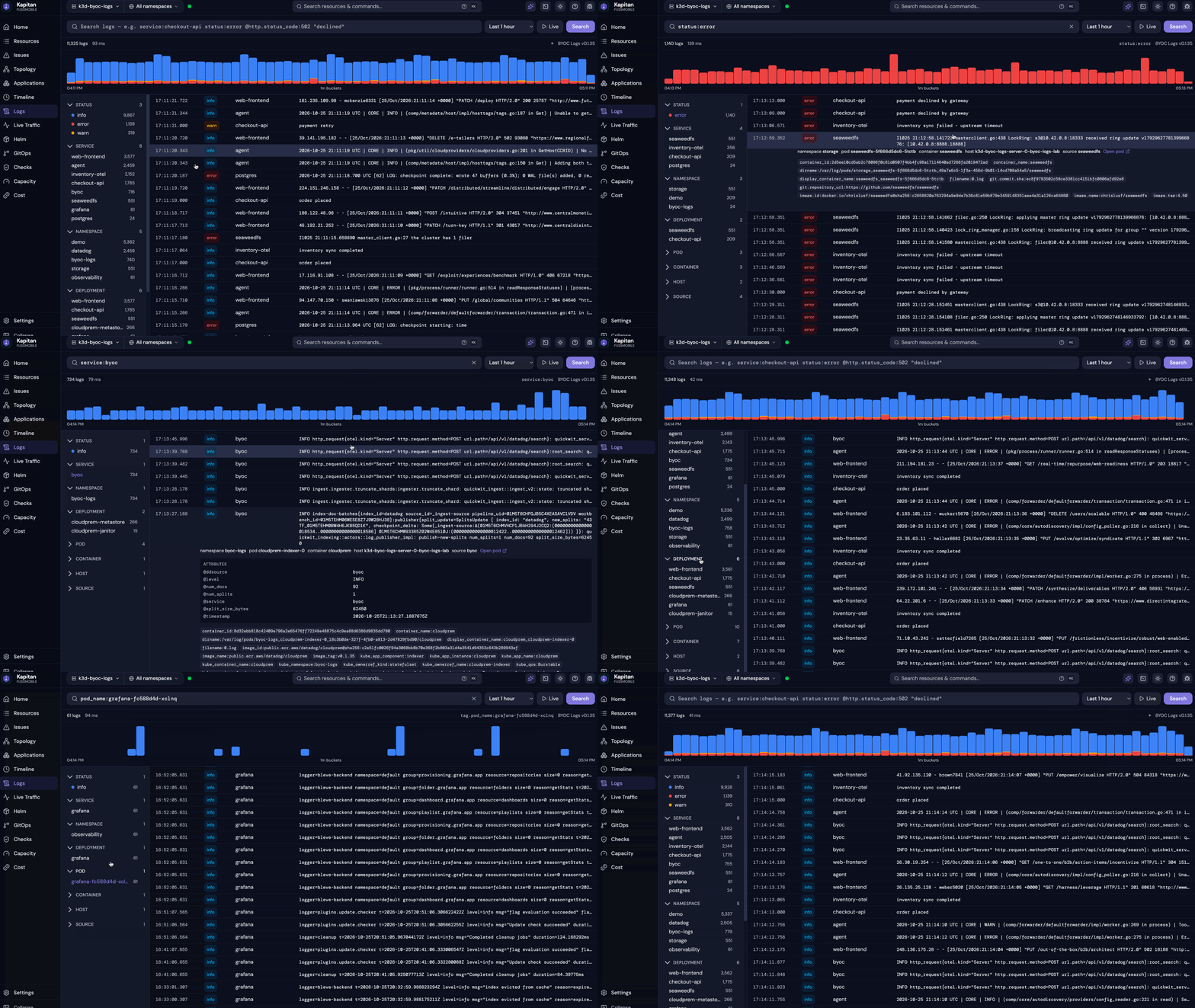
Kapitan™ integrates Datadog BYOC Logs so every log stays on the ship, fully searchable even when the satellite link is down. When the link allows, shore teams see the same logs in Datadog.
Who it's for
Wherever the connection is the weak link.
- Cruise lines
- Ferries and expedition operators
- Offshore energy
- Remote industrial and mining sites
- Air-gapped and regulated enterprises
The problem
Cost or visibility.
Until now, you had to pick one.
Sending every log line over satellite is expensive. Dropping logs to save bandwidth leaves your teams blind at exactly the wrong moment: in the middle of an incident, at sea, with no way to see what happened.
On a 60+ vessel cruise fleet, we cut telemetry over satellite by:
How it works
On the ship first. Ashore when it's worth it.
-
Step 1: Stored on board
Logs land in the vessel's own S3-compatible storage (Kapitan S3). Nothing has to leave the ship.
-
Step 2: Searched locally
Engineers search them in the Kapitan console, with or without connectivity.
-
Step 3: Forwarded when it makes sense
When the link allows, the same logs appear in the Datadog Logs console alongside metrics and traces. Forwarding is optional and can be switched off entirely.
On board
Shore
Inside the console
Search every log on board, the way your team already works.
Kapitan runs as a web application, as Linux and macOS apps, and with a central control plane for large multi-site deployments.


Web application
Open Kapitan in any browser on the ship network. Nothing to install on engineers’ machines.

Linux desktop app
A native app for operations workstations and bridge-side engineering consoles.

macOS desktop app
The same console for shore teams and travelling engineers on a Mac.

Central control plane
Kapitan Hub, for large multi-site deployments: register every ship or site, see which are connected, and manage access per organization and project in one place.
Deployment
Two ways to deploy.
Start with the full managed platform, or add on-board logs to what you already run.
Full Kapitan managed Kubernetes
Log management is included with the managed edge platform, which comes with 24/7 operational ownership.
- Log storage and search included on every ship or site
- FussMobile operates the platform end to end, 24/7
- One console for workloads, health and logs
Kapitan S3 + log management
For teams that only need local log storage and search, without a full Kubernetes engagement.
- Managed S3-compatible storage on MinIO, SeaweedFS or another S3-compatible engine
- Local log search in the Kapitan console
- Optional forwarding to your Datadog account
Compliance
Built for compliance.
Logs stay in your infrastructure
You decide what leaves the site and when, or keep everything on board.
Sensitive data flagged
Datadog's built-in sensitive-data detection flags PII and payment data.
Data residency friendly
Built for vessels in foreign ports and regulated sites, where the location of data matters.
Track record
Track record
Platforms we run on, brands we power



 Bottlerocket OS
 EKS Anywhere
 TalosOS

 CyberShell
 Thorax Tech

FAQ
Questions we hear first.
Do I need a Datadog contract?
Forwarding to Datadog uses your Datadog account. Local search in Kapitan works on its own, and forwarding can be switched off.
What happens when the link drops?
Logs keep landing on board and stay fully searchable locally. Nothing is lost.
Can we use it without the full Kapitan platform?
Yes, with the standalone Kapitan S3 + log management option.
Which storage engines are supported?
MinIO, SeaweedFS or any S3-compatible engine, managed by FussMobile.
How fast can we start?
Book a call and we'll scope a first deployment.
Book 20 minutes →Book a call
Let's talk about your logs.
Tell us about your fleet or sites. We'll set up a 20-minute call to walk through on-board log search and scope a first deployment.
FussMobile LLC · Hoboken, NJ
[email protected]